
+ FREE AI CAD SOFTWARE
AI CAD software that draws plans you can still edit
AI CAD PRO is free AI CAD software for Windows. You describe the drawing in plain words, and the assistant draws and revises real CAD objects: walls, doors, dimensions and notes. Every one of them stays editable by hand, and the assistant runs on your own ChatGPT subscription.
FREE TO USE / WINDOWS / RUNS ON YOUR CHATGPT SUBSCRIPTION
What AI CAD means here
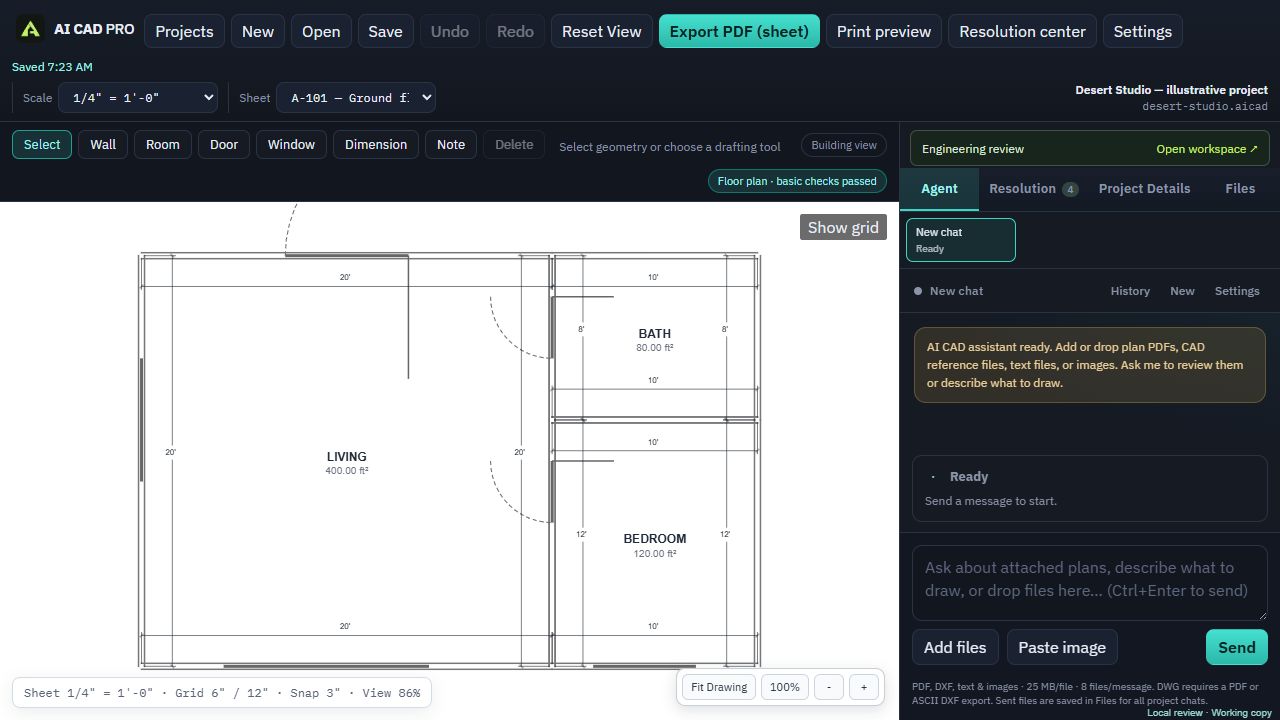
In AI CAD PRO, the AI doesn’t paint a picture of a plan. It works inside a real drawing. Ask for a 12 by 16 foot bedroom with a door on the hallway side, and the assistant places walls, a door and dimensions as objects in your project. Click any of them and you can move it, resize it or delete it yourself.
You bring the knowledge of what you want to build. The assistant handles the drafting. Then you check the result and keep shaping it together, by asking or by hand.
Things you can ask for:
- “Draw a 24 by 32 foot shop with a 10 foot overhead door on the gable end.”
- “Move the bathroom door to the hallway wall and update the dimensions.”
- “Add a site plan using the attached survey, with the new building 20 feet from the rear property line.”
The assistant revises what’s already in your project instead of starting over, one change at a time.
How it differs from an AI image generator
An image generator can make something that looks like a floor plan. But it’s a flat picture. The dimensions may not add up, you can’t move a wall, and a permit office can’t do much with it. To change anything, you start over and hope.
AI CAD PRO makes drawings, not pictures:
- Editable objects. Walls, rooms, doors, windows, dimensions and notes are separate objects you can select and change.
- Dimensioned 2D sheets. Floor plans, electrical plans, solar, site plans, elevations, sections and one-line diagrams, drawn at a scale you choose.
- Drafting tools. Polylines, polygons, arcs, hatching, leaders and detail references for the parts that need more than walls and notes.
- Print preview that matches the PDF. What you see in preview is what prints.
- A coordinated PDF sheet set. Export the whole set on Letter, Tabloid or Arch D paper.
It’s a 2D drafting tool. It isn’t a 3D modeler or a BIM program, and it doesn’t render photos of your future house.
ChatGPT CAD, on your own subscription
AI CAD PRO doesn’t charge you for AI. Instead, it connects to your own ChatGPT account. Open Settings, choose Sign in with ChatGPT, and the assistant is ready. Requests count toward your plan’s usage limits, the same as any other ChatGPT use.
If you’d rather pay per use, you can connect an OpenAI API key instead. Those requests are billed by OpenAI, not by us.
Your projects and reference files are saved on your computer. When you ask the assistant something, the relevant content is sent through your ChatGPT account to answer it. The app itself only reports anonymous usage statistics, never your drawings, files or prompts.
What you can draw with it
AI CAD PRO is built for the plan sheets DIY builders and homesteaders actually need:
- Floor plans for homes, tiny homes, sheds and workshops
- Electrical plans and one-line diagrams
- Solar plans, from the array layout to the one-line
- Site plans that show your building on the lot
- Elevations and sections
You can also bring in what you already have. Attach PDFs like surveys, old plans, scanned plans or equipment spec sheets, plus ASCII DXF files, images, and text or CSV files. The assistant uses them as references while it draws.
It can’t open DWG files. If your plans live in other CAD software, export a PDF or an ASCII DXF and attach that instead. And if you’ve already drawn something in another AI CAD PRO project, like a plot plan, you can ask the assistant to reuse it.
Checks that catch drafting mistakes
A plan set is only useful if it’s complete and readable. Two things help with that.
The Resolution center lists missing information and plan warnings. Each item comes with a recommendation and tells you where to find the information. When you accept a recommendation, the assistant applies it.
Drafting checks catch things like overlapping annotations, missing electrical connection or specification data, broken sheet references and notes that overflow their space.
They’re drafting checks, not a code-compliance review. AI CAD PRO doesn’t supply complete structural, mechanical, plumbing or other engineering calculations. No software can promise a permit: your local permitting office decides, and some projects need an engineer’s stamp. An optional review by licensed engineers is in development, but it isn’t open yet, and the free software doesn’t depend on it.
Who it’s for
AI CAD PRO is for people who are ready to build it themselves: owner-builders, homesteaders, weekend builders and anyone who can frame a wall or wire a solar array but gets stuck on the drawings.
Start with the project you have in mind: a home, a tiny home, a shed, a garage or workshop, or a solar system. If you’re not sure what drawings you need yet, the building permit drawings checklist is a good place to begin.
All you need is a 64-bit Windows PC, an internet connection for the assistant, and a ChatGPT subscription.
GOOD QUESTIONS
Questions, answered.
Is AI CAD PRO really free AI CAD software?
Yes. It’s free to download and free to use, and there’s nothing to buy. The AI assistant runs on your own ChatGPT subscription, or on an OpenAI API key billed by OpenAI if you prefer.
Can the AI change a drawing I already started?
Yes. Ask for a change in plain words and the assistant revises the objects already in your project. You can also make any change yourself with the drawing tools.
Does it work on a Mac or in a browser?
Not right now. AI CAD PRO is a desktop app for 64-bit Windows.
Can it open DWG files?
No. Export a PDF or an ASCII DXF from your other CAD software and attach that instead.
Is it a 3D modeling or BIM tool?
No. AI CAD PRO makes 2D plan sheets: floor plans, electrical, solar, site plans, elevations, sections and one-line diagrams.
FREE FOR WINDOWS
Try AI CAD on your own project.
Download AI CAD PRO, sign in with ChatGPT in Settings, and describe the first sheet you need. It’s free, and there’s nothing to buy.
Windows 64-bit · Works with your ChatGPT subscription